
Please be advised that T4 tax slips for 2020 tax year are now available for viewing and printing through the ESS (Employee Self Service) Portal: https://ess.tbrhsc.net/
To access your T4 tax slip, please log into your ESS portal and select the “Tax Slips” option.
If you are trying to access your T4 Slip or Pay Stub in Virtuo ESS and the screen is blank, please perform the following:
1) Click the “Reset” button
2) A message will appear
“This will delete your customized menu and replace it with the default. Are you sure you want to continue?” 3) Click “OK“
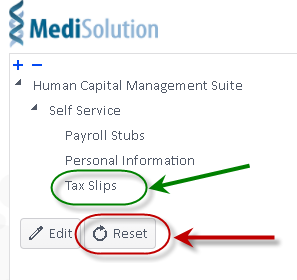
The menu system should now appear and you should be able to view your details.
If your screen is still blank please contact the Help Desk at 684-6411 for further assistance.
Please note that certain employees will have two T4 slips issued for the same tax year. Please review carefully to determine if you have been issued two T4 slips, as both will be required for income tax preparation.
Update: It was discovered that for certain individuals, boxes 24 and 26 of the T4 tax slips were not displaying correctly in Virtuo ESS. The problem has been corrected by our software provider.
If you printed your T4 tax slip prior to 10 am Monday, March 1st, then please ensure you log back into Virtuo ESS to print a new copy.
Should you have any questions or concerns, please to contact Michael Iorianni, Manager, Payroll & Accounting by telephone at 684-6917 or by email at ioriannm@tbh.net.